
Agent questions and approvals
The notification menu shows each request's creation date and, when answered, its answer date in your browser's local time. “Agent unavailable” means the originating runtime can no longer receive the response; the question heading is the agent's original prompt, not its status.
Requests automatically expire after 72 hours from creation. Change this server-wide limit in Settings → Notifications → Questions and approvals (1–8760 hours). A shorter request-specific timeout still applies. History and saved responses are retained. Supported native hooks also clear obsolete requests on a matching tool result, session stop/end or new user turn. Without those hooks ORC cannot infer continuation in an external agent; retention still applies. Dismissal never grants approval or claims an answer was delivered. Notification history expires separately after 30 days by default, even for unresolved requests; audit events default to 90 days. Both periods are configurable in Settings → Notifications → Automatic cleanup. See Notifications.
When an interactive managed agent exposes a structured question or approval, ORC automatically creates a durable request in the header's Notifications menu. Rules can also create requests. Answer the question or review the exact tool input, folder and host before approving or denying. The response goes back to that agent's original pending call. ORC does not execute the command or add privileges. Privileged execution and Windows UAC are deferred.
Private questions and prompts that cannot be represented in the inbox show a generic notice linking to the original chat. Their contents remain in that chat.
In chat, the question card lists the agent's suggestions plus a field for your own answer; Send answer needs an answer for every question. The answer stays in the conversation as your message, in place between the agent's work before and after the question; a secret answer is recorded as hidden, never as its value. Dismiss skips the question without inventing an answer and lets the agent continue, keeping the conversation open; Connect agents lists what each agent receives. Answering from the inbox instead delivers the response to the agent but does not add a message to the chat transcript; the inbox keeps its own record of the answer. Cancelling a pending request from the inbox instead withdraws it, and a managed agent waiting on that request stops.
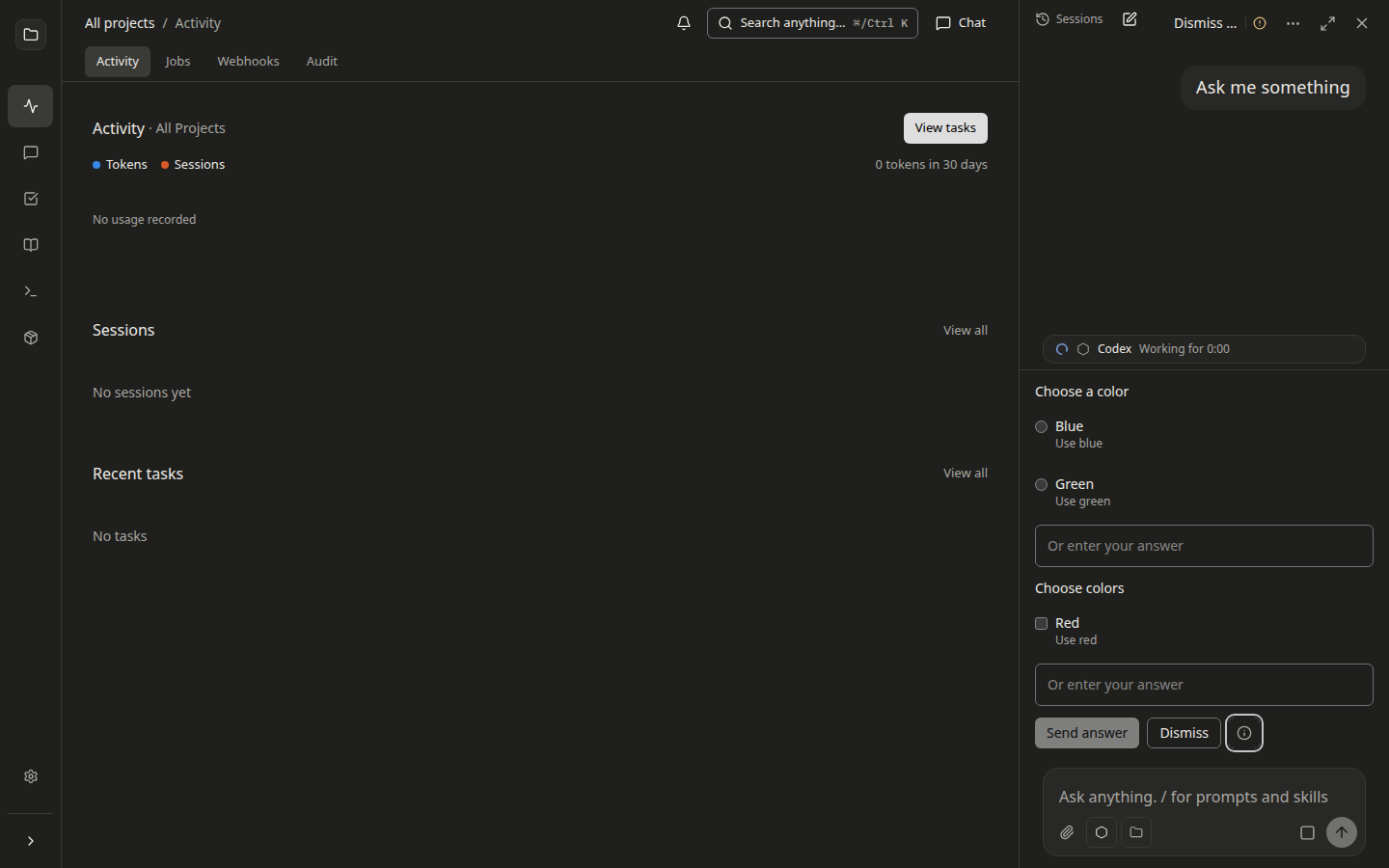
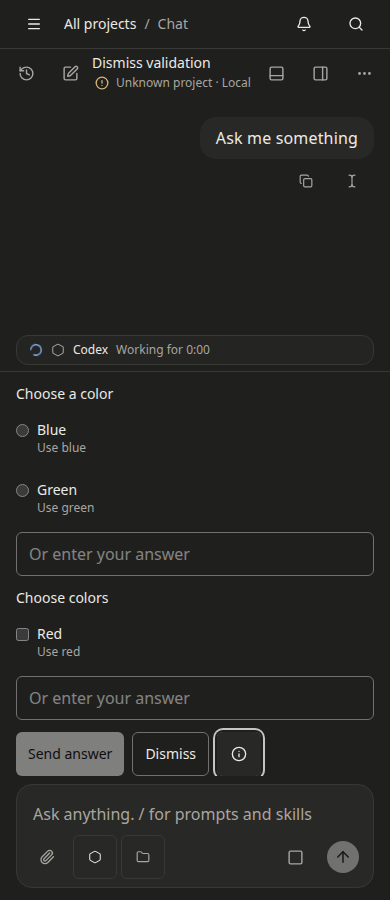
The inbox and its header indicator use ORC's shared SSE resource feed. A periodic snapshot also recovers missed events and time-based expiration. Closing or reloading the browser does not discard the request or answer. Notices identify their execution host. Duplicate suppression uses agent, host and native session identity, so a prompt on one host cannot hide another host's question. To view a completed chat after reloading, open Resume a conversation in the chat panel and select its saved conversation.
Configure Rules
Native questions and approvals do not require Rules. To customize when Rules ask for review, enable Rules (rules.enabled: true in the existing ORC JSON configuration) and add these catalog templates to the workspace policy:
- ORC · Agent questions: managed Claude/Codex structured questions and supported non-secret MCP forms.
- ORC · Agent tool approvals: managed Claude/Codex native permission requests, including command, file and additional-permission requests.
Noninteractive job runners retain their immediate-denial policy. A rejected prompt does not become an artificial human wait; explicit rule reviews still apply.
Select the Claude SDK backend (claude) or native Codex backend (codex-cli). Use the agent's default permission mode when you want native approval prompts. An agent configured to approve tools automatically may have no permission pause to report. For Claude, a separate PreToolUse Ask user rule can require review even when the agent otherwise auto-approves tools. Existing deny rules take precedence.
Rules can filter these events using the same filters as other actions. The native question's actual text and choices appear in the inbox; its configured rule prompt is used for ordinary approvals. Multi-select questions preserve their selected values; a typed answer is also supported.
Question and approval rules are distinct. A question response does not approve a tool. Ordinary approval only answers the native permission prompt; the agent's own sandbox, deny rules and operating-system permissions still apply.
Independently started agents
Explicit requests work through ORC's HTTP MCP endpoint or the existing CLI on any machine that can securely reach ORC. No helper service is installed. This is also the supported independent remote-agent path on a Windows central server. Native SSH launches retain the existing Linux/macOS central-server requirement.
MCP workflow:
- Call
human_requestwith a stable origin session/backend/request identity, request kind, prompt and optional choices. Approval requests must also include the exact action, folder and host. Retain the returned request ID. - Call
human_request_getwithidandwait_seconds: 30. Repeat while pending. Only use the answer belonging to this workflow. Do not proceed on cancellation, expiration or unavailability; denial never authorizes execution. - After consuming the answer, call
human_request_acknowledgewith its returned ID and answered version. Acknowledgement records delivery, not command success.
The MCP tools accept readable project names and honor selected MCP project bindings. A stdio caller's native session identity, when available, must match the request origin.
CLI equivalents:
orc attention request request.json --wait
orc attention list
orc attention get REQUEST_ID
orc attention respond REQUEST_ID response.json --version 1
orc attention acknowledge REQUEST_ID --version 2
orc attention cancel REQUEST_ID --version 1
Use - instead of a file for JSON on stdin. Example question:
{
  "origin": {"session_id": "my-session", "backend": "my-agent", "request_id": "color"},
  "kind": "question",
  "prompt": "Which color?",
  "choices": ["Blue", "Green"]
}
A response file contains {"kind":"question","answer":"Blue"} or {"kind":"approval","approved":false}. Reusing an origin with changed content is rejected. Concurrent, duplicate and stale-version responses are rejected.
Claude native command hooks
The catalog also includes external Claude question/approval templates. Hook timeouts must exceed the human request lifetime. For the 30-minute templates:
orc rules install-hook claude --target .claude/settings.local.json --events PreToolUse,PermissionRequest,PostToolUse,PostToolUseFailure,Stop --timeout-seconds 1815This explicitly updates ORC handlers in that settings file and preserves unrelated handlers. Install on a machine where the existing ORC CLI and policy database are already available. Configure its authenticated API connection through existing secure configuration/environment references.
PreToolUse approvals are qualified against a real independent Claude process. Approved execution is acknowledged by its post-tool hook; a denied tool has no post-tool hook, so its natural Stop acknowledges the denial. Keep those lifecycle handlers installed. PermissionRequest uses its distinct native JSON decision envelope and does not rely on exit code 2 to deny.
Native hook availability depends on the installed agent and launch mode. In the tested Claude CLI 2.1.310, print mode did not expose AskUserQuestion with a command hook alone. Use the proven managed SDK question path or explicit MCP/CLI requests for that case. An independently running Codex terminal cannot be intercepted by ORC's separate app-server session; use explicit MCP requests there. Plain text such as “Should I continue?” is not a structured pause event.
The session watcher also detects a live Codex request_user_input question from its transcript and shows a read-only session notice until the matching answer or turn cancellation is recorded. With the lifecycle hooks installed, a Claude permission prompt or question and a Gemini tool-permission prompt set the same Waiting for you state and send one attention push. Open its existing ORC terminal when available, or view the session and answer in its original interface. The watcher does not infer approval prompts from unfinished tools or deliver answers through transcripts. Live Codex ownership is also refreshed every 30 seconds on local and remote hosts, so a process exiting without a final file write clears its stale status and notice. Other independent prompts need the explicit MCP/CLI request or qualified native hook described above. ACPX handles permissions in its own CLI and does not expose a pending interactive approval to ORC's runtime adapter. Secret questions remain in the native interface.
Cursor Agent
Real Cursor Agent validation covers explicit MCP questions and approval replies, plus native Shell approval through its existing preToolUse Rules hook. For native Shell review, configure an event rule scoped to Cursor, pre_tool, with tool equal to Shell, and an Ask user → Approval action. Install the matching receipt hooks as well:
orc rules install-hook cursor --target .cursor/hooks.json --events preToolUse,postToolUse,postToolUseFailure --timeout-seconds 1815Supply a valid working directory; ORC rejects an empty native hook directory. Approval returns Cursor's native permission response. The original Cursor process executes the command; its tool result acknowledges delivery. A denied tool's failure event acknowledges the denial.
For questions, use the explicit MCP workflow above. Cursor native question interception is not qualified. In unattended Cursor CLI runs, approving the MCP server with --approve-mcps can still leave individual tool calls blocked. Allow only the required tools in the workspace's .cursor/cli.json, following Cursor's permissions reference:
{
  "permissions": {
    "allow": [
      "Mcp(orc:human_request)",
      "Mcp(orc:human_request_get)",
      "Mcp(orc:human_request_acknowledge)"
    ]
  }
}
Replace orc with that server's name in .cursor/mcp.json. This permits calling the request service; it does not approve the requested action.
Telegram and Slack
Enable either notification checkbox on the Ask user action. A channel connection's authorized recipients get the request on that platform when its selected project matches the request. Select the intended project in the channel chat first with /project. Notifications are off by default.
The notification supplies an explicit response command:
/attention REQUEST_ID VERSION answer My answer
/attention REQUEST_ID VERSION approve
/attention REQUEST_ID VERSION deny
Replies are checked against the current authorized user and the original chat/thread/request/version binding before they reach agent chat. Large requests that cannot be shown completely, and multi-select forms, require the web inbox. Notification failures retry through durable leases; a repeated notification cannot cause a repeated decision. Telegram/Slack routing is tested at the adapter boundary; live provider credentials were not used during validation.
Lifecycle and limits
| Situation | Behavior |
|---|---|
| Browser disconnect/reload | Request and answer remain in SQLite; SSE reconnect fetches the current snapshot. |
| Native call cancelled | Pending request is cancelled; a late answer is rejected. |
| Native connection lost | Request becomes unavailable and cannot authorize anything. An abruptly lost waiting owner is detected after its 30-second heartbeat lease. |
| Rule changed/disabled while waiting | The old review is invalidated. Every matching rule revision must remain active. |
| Answer saved | Shows answered until delivery is acknowledged; this does not mean a command ran. |
| Managed daemon dies | Requests remain, but a dead native process is not automatically recreated. Its outstanding owned request becomes unavailable. |
| Independent CLI/MCP workflow restarts | It can reconnect using its retained request ID and stable origin. |
| Expired or unavailable request | No approval is granted; unavailable answers remain visible for inspection and can be dismissed. |
Supported MCP forms contain non-secret primitive fields. URL authentication, secret fields and unsupported schema constraints are explicitly cancelled with a status explaining that the native client is required. Passwords belong in a separate credential flow, never in an inbox answer.
Implementation evidence and opt-in native verification commands are recorded in Attention verification.