
Configuration
Coding providers
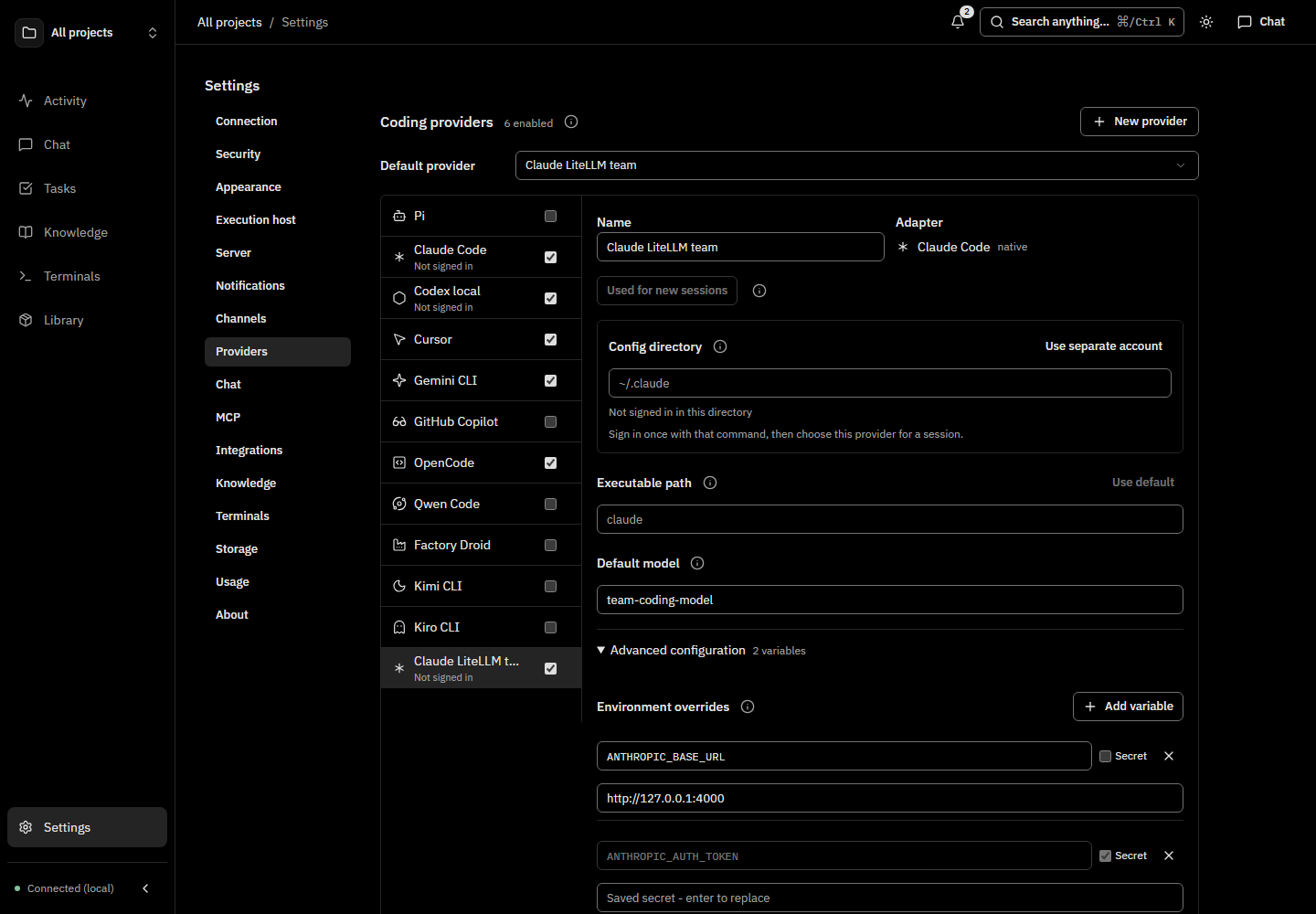
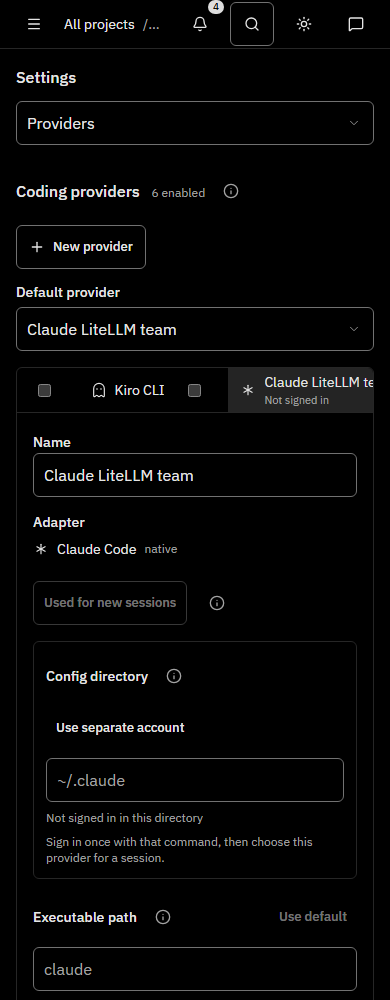
Open Settings → Agents → Providers. Choose New provider, name it (for example, Claude LiteLLM), select a coding-agent adapter, and configure its connection. You can create several providers using the same adapter. Claude Code and Codex use native integrations; Pi uses its native RPC interface, OpenCode uses direct ACP, and other coding agents use acpx. Field guidance and examples live behind info icons: hover, focus or tap to read them.
Choose an enabled Default provider for new chats. Each provider has a default model; leave it blank to use the adapter's default. The chat picker selects named providers and can override the model and launch options for that conversation. An explicit choice in this browser is remembered across reloads; saving provider settings clears that browser override so the saved defaults take effect. Unsent model and option edits are retained separately for each provider while switching. Switching to another provider of the same agent keeps the conversation: ORC rebuilds the native session for the new account on the next turn and replays a bounded transcript of the chat so you can continue where you left off. Switching to a different agent starts a new conversation. Existing conversations retain their provider ID and model when the default changes. Disabling a provider hides it from new launches while allowing its existing conversations to resume. Conversations saved before profiles existed remain pinned to their original native provider.
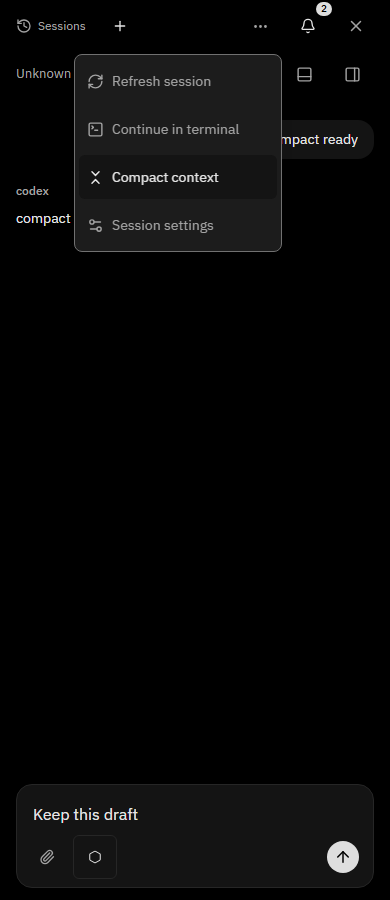
Phone layout · Compact context action
For Claude, Codex, OpenCode and Pi, Executable path overrides the local binary for native chat, model discovery and provider terminal launches. Enter a path without arguments, or leave it blank for the default installation. Paths with spaces and ~/ work. SSH uses the remote installation. Changes apply at the next launch; ORC does not restart running processes.
Advanced configuration starts collapsed:
- Environment overrides apply to launches and native model discovery, including SSH. Values override the execution environment; an empty value clears an inherited value. Use variables such as
CODEX_HOMEorCLAUDE_CONFIG_DIRfor a separate CLI configuration, or set Config directory as described below. An explicit environment row wins over that directory. ORC does not create login credentials or copy an existing login into a new directory. - Mark sensitive values Secret. Credential names such as
ANTHROPIC_AUTH_TOKENrequire this automatically. Secrets are encrypted on the API host and are write-only in the UI. An untouched saved placeholder preserves its value; entering a replacement changes it. Remove a row to stop overriding that variable. Transport and ORC connection variables are managed by ORC. - Chat launch options (JSON) accept validated adapter options: Claude SDK options such as
{"effort":"high","maxTurns":20}, or supported Codex/acpx argument arrays. ORC owns session, transport and working-folder arguments. Explicit session options take precedence over provider defaults. Native terminal launches use provider environment and, for Claude/Codex, model; chat JSON options are for the chat adapter. Package setups keep their own launch configuration.
Separate Claude and Codex accounts
Create another provider with the same adapter to work with more than one Claude Code or Codex login. While creating the provider, enable Use a separate account, or open an existing provider and set Config directory:
| Adapter | Variable | Default |
|---|---|---|
| Claude Code | CLAUDE_CONFIG_DIR | ~/.claude |
| Codex | CODEX_HOME | ~/.codex |
Each directory holds that account's CLI login, session history and state. The provider passes it to native chat, model discovery and terminal launches for Claude/Codex profiles; other adapters ignore the field. ~/ expands on the API host, so use an absolute path for an SSH execution host. Leave it blank to use the host default. An explicit CLAUDE_CONFIG_DIR or CODEX_HOME environment row still wins.
The provider card reads the account label, plan and organization from the CLI's own files on the API host and shows a copyable sign-in command. Run that command once in a terminal, sign in, then select the provider in the chat picker. ORC never stores, refreshes, relays or returns credentials. Two providers that point at the same login are flagged so a switch does not silently reuse one account. Use for new sessions saves that provider as the default without opening the full form.
Settings → Usage shows a quota card per configured Claude/Codex provider and for Alibaba Cloud when the Bailian CLI (bl) is installed, and session discovery, the live-session watcher and transcript search include every configured directory. Remote SSH accounts are not inspected: identity, quotas and session discovery for separate accounts currently read the local API host only. ORC does not rotate accounts automatically when a quota is exhausted; switch the provider in the picker and continue.
Use Save changes to save the provider list, default and advanced settings together. Drafts survive switching providers and Settings sections. Use default clears an executable override; Discard changes restores saved values. Failed saves retain the draft. Concurrent edits are rejected rather than overwriting another device's settings; Discard draft and reload loads the saved version.
Pi
Install Pi 1.5.2 or newer on the execution host, with Node.js 22.19 or newer, and configure its model credentials in Pi. Create a provider in Settings → Agents → Providers and choose Pi. Pi is optional and is not enabled by default. ORC uses pi --mode rpc, preserving Pi's own credentials, extensions, skills and session files. An executable override selects the local Pi installation; SSH uses the remote installation.
The model picker discovers configured models without an inference turn. Use provider/model to distinguish identical model IDs from different providers. Chat launch options (JSON) accepts an object such as:
{
  "thinkingLevel": "high",
  "steeringMode": "one-at-a-time",
  "followUpMode": "one-at-a-time",
  "autoCompaction": true,
  "autoRetry": true
}
Thinking levels are off, minimal, low, medium, high, xhigh and max; Pi applies the selected model's limits. Queue modes are all or one-at-a-time. These controls also work as native Pi options for agent jobs using agent pi. Queue mode, auto-retry and auto-compaction changes are saved to Pi's own settings on the execution host, so external Pi sessions use them too. Thinking level is scoped to the ORC session. ORC owns transport, session identity, working folder and its permission bridge; arbitrary Pi command-line arguments are not accepted.
Pi supports streamed text/thinking and tool results, images on compatible models, native session resume, mid-response steering, cooperative Stop, extension questions, permission prompts, live permission changes and /compact. Default permissions ask before each tool; Accept edits allows Pi's edit/write tools, and bypass permits all tools. An approval for the session applies to that tool name. This gates Pi's tool calls; it is not an operating-system sandbox or a restriction on extension code. Plan permissions and ORC tool whitelists are rejected rather than silently ignored.
With ORC tools enabled, ORC registers an authenticated, scoped MCP connection through a temporary session extension. It waits for tools to connect and refuses to start if the bridge fails. It does not edit ~/.pi/agent/mcp.json or .pi/mcp.json. Resume uses Pi's exact native session UUID; missing sessions produce an error instead of creating another conversation. Keep the execution host and its Pi session directory available for saved conversations.
Pi's terminal-only custom components and editor replacement are not reproduced in ORC. Native Pi sessions are discovered and can resume in chat or a terminal; see Live agent sessions for session directories and provider selection. Fork/rollback and native account quota controls are not exposed. Active ORC rules that require unavailable interception prevent the session from starting.
Bedrock and LiteLLM examples
These are environment configurations of the Claude adapter:
| Configuration | Environment overrides |
|---|---|
| Claude Bedrock | CLAUDE_CODE_USE_BEDROCK=1, AWS_REGION, and an AWS_PROFILE configured on the execution host |
| Claude LiteLLM | ANTHROPIC_BASE_URL pointing to your gateway and a secret ANTHROPIC_AUTH_TOKEN |
Choose the model ID supported by your gateway or Bedrock deployment. If an inherited ANTHROPIC_API_KEY conflicts with gateway authentication, add an empty secret override for it. AWS profiles, gateway routing and optional endpoint variables remain native Claude configuration; see Claude on Bedrock, Claude gateway configuration and LiteLLM's Claude Code guide. The configured URL is reached from the execution host, so a loopback proxy must run on that host.
Storage and API
Authenticated GET/PUT /api/settings/providers reads and replaces {providers, default_provider_id, revision}. Each provider has id, name, agent, enabled, executable, optional home, model, optional options, and environment: [{name, value, secret}]. home is the CLI config directory used by Claude Code and Codex providers; blank or absent means the host default. Secret values are returned as null; send that placeholder unchanged to retain a saved secret with the same provider and variable name. New or renamed secrets require a value. Send the current revision when saving; stale writes return 409. An existing provider's adapter is immutable; create another provider to change adapters.
Authenticated GET /api/settings/providers/accounts returns the account identity ORC can read from each provider's config directory: status, label, organization, plan, duplicate marker and a sign-in command. It never returns tokens or credential contents.
Private configuration lives under providers.instances and providers.default_id in the server's JSON config. Encrypted values use ORC's machine key at ORC_HOME/secret.key; back up that key with the config. Provider secrets are excluded from readable workspace preferences. Existing preferences.agents, preferences.provider_paths and chat defaults are migrated when saving Providers and remain compatible with GET/PATCH /api/settings. Without saved profiles, the existing CLI login, paths and chat settings are used.
Local account limits starts collapsed. Check limits reuses the local-account quota reader below; it does not report gateway/Bedrock billing or SSH quotas. There is no provider health polling. Native Claude quota rejections and Codex usage-window notices include reset times when supplied by the agent. Claude extra usage is distinguished from a blocked request. A failed turn holds queued messages; retry explicitly after access returns. ORC does not switch accounts automatically or schedule quota retries; use the chat picker to move the open conversation to another account of the same agent.
Project workspace environment
Open a project and use Edit → Workspace, or fill the Workspace step while creating a project. These settings apply to terminals, flow-node sessions, chat turns and job actions that run in that project's folders.
- Setup script runs once in each new managed worktree under
.orc/worktrees,.claude/worktreesor.codex/worktrees, before the first agent or terminal starts there. ORC runs it with the project's shell on the terminal's host, from the worktree folder. A failed or timed-out script is recorded with its output and the agent still starts. A setup cut off by an ORC restart is reported as failed once its timeout has passed. The script does not rerun for an existing worktree, and a project's main checkout is never prepared for you. Setup timeout is 900 seconds by default (30–3600). - Dev script starts with Start dev server in the terminal launcher. It opens as a shell terminal in the current folder; the first printed
http(s)URL becomes the workspace preview link. Loopback hosts such as0.0.0.0and::are shown aslocalhost, and later URLs in the same terminal are ignored. - Port range gives each workspace a stable block instead of a single port. The first workspace of a project starts at 3100 with 10 ports unless Port range start or Ports per workspace is changed (1-100); changing either turns ports on even without scripts. Later workspaces take the next free block, and blocks never overlap on the same API host, even across projects. Ports already bound on a local host are skipped; SSH hosts cannot be probed, so only ORC's own allocations are avoided there. A block is released when ORC removes the worktree. A local block whose folder was deleted while its repository is still present is reclaimed by the project's next workspace, or by any project once no block is free. If no block can be found, the terminal or chat still starts without ports and says why.
- Environment holds extra variables for every launch in the project. Mark sensitive values Secret to encrypt them with ORC's machine key; secrets are write-only and read back as empty placeholders. An untouched placeholder keeps the saved value.
ORC_names are reserved for ORC.
Once a project has a setup script, a dev script, a Port range start or a changed Ports per workspace, workspaces export PORT, ORC_PORT, ORC_PORT_END, ORC_PORT_COUNT and ORC_PORT_1…ORC_PORT_<count>, plus ORC_PROJECT_ID and ORC_WORKSPACE (ORC_WORKTREE only inside a managed worktree). Without any of them, only the project environment values are added. Any folder inside a managed worktree shares that worktree's ports and setup, and ORC_WORKSPACE is the worktree folder. Project environment values are added last.
Setup status, ports and the preview link appear in a session's inspector and on a task's Git links, and are readable through GET /api/workspaces. The preview belongs to the workspace path and is cleared when its dev terminal exits. Deleting a project removes its workspace rows. Flow nodes run in the task's checkout; per-node worktrees are not created yet.
Manual context compaction
For an existing idle Claude, Codex, OpenCode or Pi chat, choose Compact context from session actions (an icon in the expanded desktop header), or send /compact. This uses the same native session: Claude's SDK command, Codex's thread/compact/start RPC, OpenCode's own /compact command, or Pi's compact RPC. Progress, failures and completion use the normal conversation stream and history. Running turns, attachments and integrations without native support cannot be compacted this way. Keep automatic compaction under the agent's own control; Claude sessions with slash commands explicitly disabled must enable them first. There is no ORC idle-compaction timer. Compaction summarizes model context and may use provider quota; it does not erase the displayed ORC transcript.
The context meter beside Send shows how full the agent's context is. It shows a ring and a percentage when the agent reports its model's window (Codex, and Claude, Pi and OpenCode chats run through ORC), and raw tokens otherwise. OpenCode counts the same total its own sidebar shows: input, output, reasoning and cache tokens of the last request. From 80% it warns that the agent will soon compact or stop. Open it for exact tokens, cache reuse and the compaction count.
Usage in Settings
Open Settings → Usage for request-level token usage and account quotas. ORC indexes each assistant request recorded by the local Claude, Codex, Pi, OpenCode, Gemini and Cursor importers: model, request time, input, output, cache-read, cache-write, reasoning and unsplit totals. The page groups that ledger by agent, model and UTC day or hour, so the selected period reflects tokens consumed during the period rather than lifetime totals of sessions that started in it.
Filters narrow the page by period (24 hours, 7, 30 or 90 days, or all time), time bucket, agent and model. The distribution table shows model shares and expands a model to its token split and request, session and estimate counts. Clicking an agent filters the page to that agent. The default view keeps long lists compact; secondary detail opens on demand and the account quota list starts collapsed.
Gemini records only a per-message total, and Cursor exposes a context estimate rather than per-request usage, so those requests are marked estimated. Codex rollouts larger than the import cap keep their lifetime total as an estimated remainder, and model names are unknown for that remainder. Codex also rotates closed rollouts to <rollout>.jsonl.zst; ORC reads those compressed rollouts, so periods that include older sessions stay exact. A session whose transcript is gone entirely keeps its lifetime total as one estimated request when a total is known, and is settled once instead of staying pending forever. Claude output splits thinking tokens out of output, and cached input is counted once. Repeated assistant messages are counted once by message id. The Coverage section reports sessions started in the period that have not been indexed yet and excludes their lifetime totals from the distribution, rather than mixing the two accounting models. A session is not re-indexed when its activity stays inside the second the ledger already recorded, and a larger backlog drains in bounded batches. Sessions from agents that do not record token usage (for example Cursor Agent chats) are reported separately instead of being counted as pending. No billed cost is shown: ORC has no reliable price source for every provider and plan.
Raw requests are kept for 95 days, just past the 90-day window, so every normal period stays exact. Older usage rolls up per session, UTC day and model: totals, model/agent shares, request counts and session counts survive for All time without keeping every request. A single session that exceeds 5,000 rows inside the window also compacts its oldest rows by model. Retention runs on the normal session-sync path, not on a timer or a page poll.
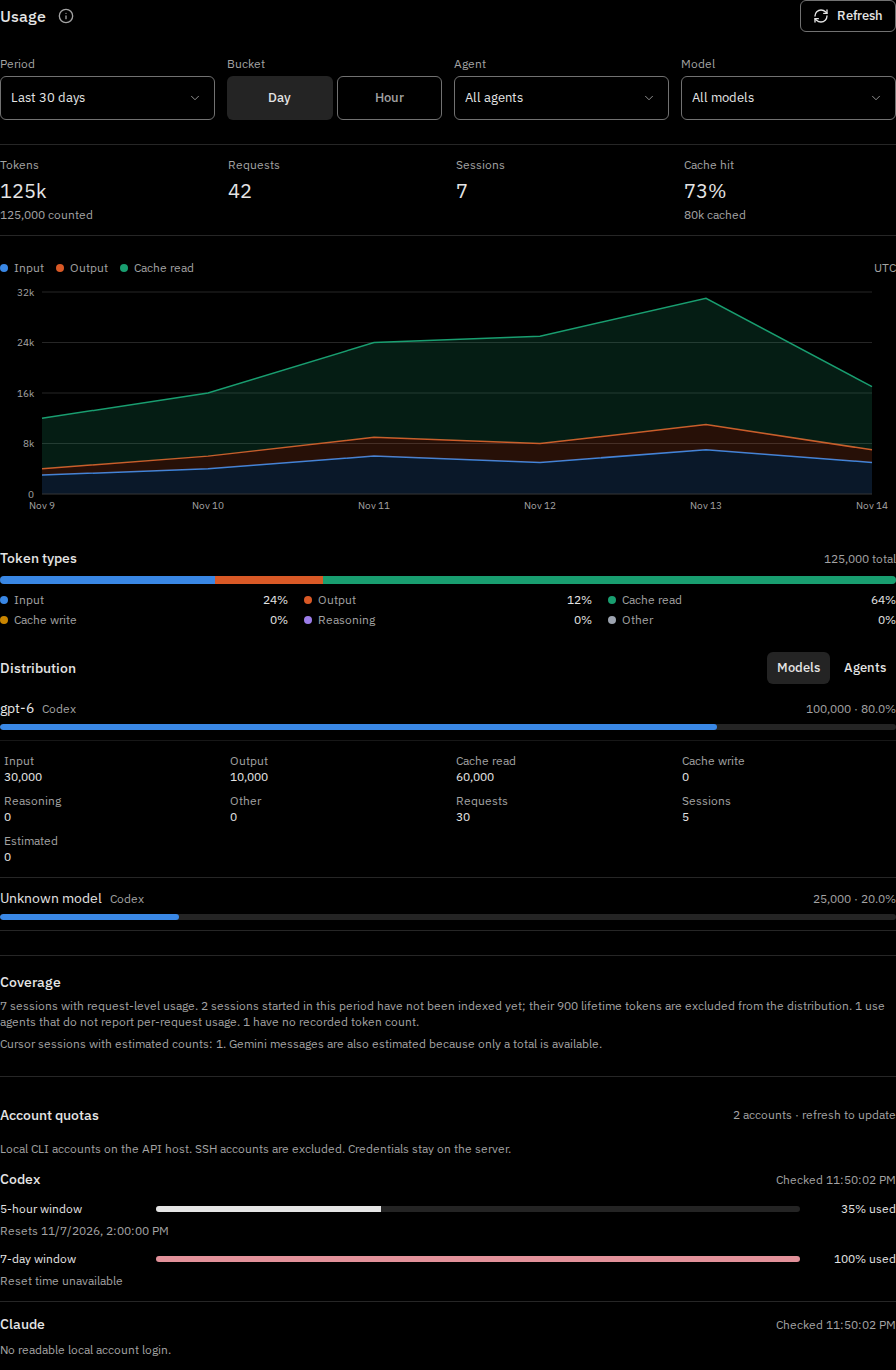

Account quotas show percentage used and reset times for local Codex and Claude accounts on the API host, one card per configured provider. ORC reads the existing CLI login from each provider's config directory—CODEX_HOME/auth.json (default ~/.codex/auth.json) or CLAUDE_CONFIG_DIR/.credentials.json (default ~/.claude/.credentials.json)—and requests quota data from the provider over HTTPS. Credentials stay on the server and are never returned to the browser. Keychain-only, API-key and SSH-host logins are not supported. Missing logins, expired access and unsupported provider responses display an unavailable state. Sign in again using the provider CLI when access expires; ORC does not refresh or modify provider credentials.
When the Bailian CLI (bl) is on the API host's PATH, Usage also shows an Alibaba Cloud card. ORC runs bl usage token-plan --output json with an 8-second timeout and displays the reported monthly token-plan percentage and reset time. Only the percentage and reset timestamp are returned to the browser; the CLI's stored credentials are not read by ORC. An account without an active token plan, a missing login and an unreachable CLI all display an unavailable state. Alibaba Cloud coding-plan quotas are not shown.
The authenticated read-only routes GET /api/usage/report, GET /api/usage/history and GET /api/usage/quotas expose the same data. Report accepts days=1|7|30|90|0, granularity=day|hour, and optional agent and model filters; model __unknown__ selects requests without a model. History remains available for clients that need lifetime totals by session start date. Quota requests share a 60-second server cache and an 8-second provider timeout. The Usage panel refreshes itself from the shared SSE change stream when newly indexed requests arrive; it does not poll. Refresh re-reads both views on demand and respects the quota cache. Provider quota interfaces can change; unavailable quota data does not prevent usage from loading.
Where ORC keeps its config and data, every config key and environment variable you are likely to set, logs, running as a background service, and authentication.
Notification and audit retention
Set these server-wide preferences in Settings → Notifications → Automatic cleanup or the JSON config:
| Config key | Default | Allowed days |
|---|---|---|
preferences.notification_retention_days | 30 | 1–3650 |
preferences.audit_retention_days | 90 | 1–3650 |
All notifications expire, including unresolved requests' alerts. Audit history retains the notification title and message independently until the audit event expires. The audit log is also capped at 200,000 rows, oldest removed first. Expiry filters apply immediately; the API performs bounded cleanup at startup and every minute. Freed SQLite pages are reusable but the file may not shrink. See Notifications.
Files and directories
| Path | Holds |
|---|---|
ORC_HOME/config.json | Global config. The CLI (orc project use), the dashboard and the desktop app write here. |
./.orc/config.json | Optional config read from the directory the process starts in |
ORC_HOME/orc.db | SQLite database (db.path) |
ORC_HOME/knowledge/ | Knowledge base files and index (beside the database) |
ORC_HOME/secret.key | Key that encrypts stored secrets. Back it up with the database. |
ORC_HOME/logs/orc.log | Structured log |
ORC_HOME/daemon.log | Daemon stdout/stderr when run as a launchd or systemd service |
ORC_HOME/daemon.pid | PID of the running daemon |
ORC_HOME/daemon.json | Private runtime identity and current port of the running daemon; contains no credentials |
ORC_HOME/desktop-daemon.log | Daemon output when the desktop app started it |
~/.orc/bin/ | CLI installed by the desktop app |
ORC_HOME defaults to ~/.orc, where ~ is HOME (USERPROFILE on Windows). Show the resolved paths and daemon state:
orc homePrecedence
Later wins:
~/.orc/config.json./.orc/config.json- Environment variables
- Global CLI flags (
--port,--host,--db,--secret,--log-level,--runner-timeout,--runner-max-jobs,--snapshot-max-bytes)
An invalid config file stops ORC with Invalid orc config and the failing key.
Example config
{
  "api": { "port": 7700, "host": "127.0.0.1", "secret": "change-me" },
  "activeProject": "my-app",
  "agent_loop": {
    "enabled": true,
    "default_backend": "claude",
    "max_workers": 2
  },
  "runner": { "default_timeout_secs": 300, "max_concurrent_jobs": 5 },
  "rules": { "enabled": true }
}
Config keys
api
| Key | Default | Env | Purpose |
|---|---|---|---|
api.port | 7700 | ORC_API_PORT | API, dashboard and MCP port |
api.host | 127.0.0.1 | ORC_API_HOST | Bind address. 0.0.0.0 exposes ORC on the network. |
api.secret | none | ORC_API_SECRET | Bearer secret. Unset means no auth. |
api.session_days | 30 | ORC_API_SESSION_DAYS | Dashboard sign-in and default token lifetime (1-365) |
api.cors_origins | [] | ORC_API_CORS_ORIGINS (comma-separated) | Extra browser origins allowed to call the API |
db, activeProject
| Key | Default | Env | Purpose |
|---|---|---|---|
db.path | ORC_HOME/orc.db | ORC_DB_PATH | SQLite file |
activeProject | none | ORC_ACTIVE_PROJECT | Default project for CLI and MCP calls |
agent_loop
The task loop picks up todo and changes_requested tasks and runs agents on them.
agent_loop.enabled only turns the subsystem on at startup. Its cycles are recorded under the orc-task-loop system job, and disabling that job (Jobs page, orc jobs) stops every automatic cycle — scheduled ticks, task-change triggers and follow-ups — even while the setting is true. The disabled state survives restarts and re-enabling the job resumes the loop without an environment change. Disabling does not stop agents that are already running.
| Key | Default | Env |
|---|---|---|
agent_loop.enabled | false | ORC_AGENT_LOOP_ENABLED |
agent_loop.poll_interval_minutes | 5 | ORC_AGENT_LOOP_POLL_INTERVAL |
agent_loop.max_workers | 1 | ORC_AGENT_LOOP_MAX_WORKERS |
agent_loop.default_backend | claude | ORC_AGENT_LOOP_DEFAULT_BACKEND |
agent_loop.session_idle_timeout_minutes | 20 | ORC_AGENT_LOOP_IDLE_TIMEOUT |
agent_loop.session_max_lifetime_minutes | 120 | ORC_AGENT_LOOP_MAX_LIFETIME |
agent_loop.worker_auto_approve | true | ORC_AGENT_LOOP_AUTO_APPROVE |
agent_loop.default_flow | orc-default | ORC_AGENT_LOOP_DEFAULT_FLOW |
agent_loop.review_flow | orc-review-only | ORC_AGENT_LOOP_REVIEW_FLOW |
agent_loop.max_node_retries | 2 | ORC_AGENT_LOOP_MAX_NODE_RETRIES |
agent_loop.max_flow_runs_per_task | 6 | ORC_AGENT_LOOP_MAX_FLOW_RUNS |
Long-running work. session_idle_timeout_minutes reclaims sessions that stop reporting activity; session_max_lifetime_minutes is a separate absolute ceiling so a chatty-but-hung agent cannot hold a worker slot forever. A worker driving an active goal is exempt from the absolute ceiling while it keeps making progress — a goal loop is meant to run for hours — but an idle goal worker is still reclaimed. Non-goal sessions keep the ceiling unchanged.
When a worker dies for infrastructure reasons (idle timeout, lifetime cap, daemon restart), the node is retried in place up to max_node_retries, and the retry resumes the previous native session when one exists, so the turn is lost but the conversation is not; a fresh session starts only when there is nothing to resume. Retries do not consume graph visits or loop budget. After a daemon restart, orphaned running workers are settled immediately — their slots free at once and resume retries are queued without waiting for the idle sweep. Command checks hold no worker slot and are never starved by a saturated pool.
Run orc doctor to see which backends are usable. See Task flows.
runner (jobs)
| Key | Default | Env |
|---|---|---|
runner.default_timeout_secs | 300 | ORC_RUNNER_TIMEOUT |
runner.max_concurrent_jobs | 5 | ORC_RUNNER_MAX_JOBS |
runner.log_retention_days | 30 | ORC_RUNNER_LOG_DAYS |
context, memory
| Key | Default | Env | Purpose |
|---|---|---|---|
context.snapshot_max_bytes | 2048 | ORC_SNAPSHOT_MAX_BYTES | Session snapshot budget |
context.layer1_task_limit | 10 | ORC_LAYER1_TASKS | Tasks in the context result |
context.layer1_memory_limit | 30 | ORC_LAYER1_MEMORIES | Memories in the context result |
memory.max_content_chars | 800 | none | Longest memory content |
knowledge
| Key | Default | Env |
|---|---|---|
knowledge.root | beside db.path | ORC_KNOWLEDGE_ROOT |
knowledge.parser | auto | ORC_KNOWLEDGE_PARSER |
knowledge.embedding.provider | none (none, ollama, openai) | ORC_KNOWLEDGE_EMBEDDING_PROVIDER |
knowledge.embedding.base_url | provider default | ORC_KNOWLEDGE_EMBEDDING_URL |
knowledge.embedding.model | provider default | ORC_KNOWLEDGE_EMBEDDING_MODEL |
knowledge.embedding.api_key | none | ORC_KNOWLEDGE_EMBEDDING_API_KEY |
knowledge.max_upload_bytes | 104857600 (100 MB) | none |
Most knowledge settings are also editable under Settings → Knowledge.
terminals, ssh
| Key | Default | Env | Purpose |
|---|---|---|---|
terminals.enabled | true | ORC_TERMINALS_ENABLED | Browser terminals |
terminals.max | 8 | none | Concurrent terminals (1-64) |
terminals.shell | unset | ORC_TERMINALS_SHELL | Shell executable, or a JSON array of executable and literal arguments |
ssh.host | none | ORC_SSH_HOST | ~/.ssh/config host alias to run agents, terminals and git on |
ssh.remote_port | none | ORC_SSH_REMOTE_PORT | Port the reverse tunnel opens on the SSH host so agents there reach ORC |
In JSON configuration, "terminals": { "shell": ["pwsh", "-NoLogo", "-NoProfile"] } launches PowerShell without personal profiles. The first array entry must be a nonempty executable; up to 64 entries are supported. Arguments are passed literally, without shell parsing. Existing executable strings remain supported, including ORC_TERMINALS_SHELL; that environment variable accepts an executable, not a command line or JSON array. An unset shell keeps the platform default, including its usual profile loading.
Pick the execution host from the SSH row under Settings → Hosts: Change, then choose Local or an alias. Switching applies to new actions. When ORC_SSH_HOST is set, the selection is fixed.
rules, mcp, github
| Key | Default | Env | Purpose |
|---|---|---|---|
rules.enabled | false | ORC_RULES_ENABLED | Enforce agent rules |
mcp.default_mode | meta | none | MCP tool surface: meta or full |
mcp.code_execution | true | none | Make tool_execute available in meta mode on local stdio and authenticated HTTP connections. |
github.token | none | ORC_GITHUB_TOKEN | Token for ORC's GitHub calls (pull requests, reviews) |
Channels (Telegram, Slack)
Channels are configured only under Settings → Connections → Channels; there is no config-file channels or gateway section. ORC_TELEGRAM_TOKEN, ORC_SLACK_BOT_TOKEN, ORC_SLACK_APP_TOKEN, ORC_SLACK_USER_TOKEN and ORC_SLACK_USER_COOKIE set up nothing by themselves — reference one as a connection's credential (env:ORC_TELEGRAM_TOKEN, env:ORC_SLACK_BOT_TOKEN, env:ORC_SLACK_APP_TOKEN, env:ORC_SLACK_USER_TOKEN, env:ORC_SLACK_USER_COOKIE) when saving the connection, so the token stays out of the database. See Notifications → Inbound rules for routing.
Slack has two providers. slack runs a Slack app (bot token + Socket Mode app token) and posts as the bot. slack-user runs on your own Slack session (xoxc token + d cookie, via earshot) and posts as you — for workspaces where installing an app is not possible. The session cookie is a full-access secret; treat it like a password. See Notifications → Slack user session.
speech, tts
| Env | Purpose |
|---|---|
ORC_SPEECH_PROVIDER | openai, groq or qwen |
ORC_SPEECH_LANGUAGE | Transcription language |
ORC_TTS_PROVIDER | openai or qwen |
ORC_TTS_VOICE | Voice (provider default) |
ORC_TTS_MODE | voice_only or always |
ORC_OPENAI_API_KEY, ORC_GROQ_API_KEY, ORC_QWEN_API_KEY | Speech provider keys |
Setting any ORC_SPEECH_* or provider key enables speech; setting any ORC_TTS_* enables text-to-speech.
Speech powers composer dictation in the web and desktop app and voice messages in channels. Dictation is available once speech.enabled is true and the selected provider has an api_key (or, for openai and groq, a base_url); GET /api/speech/status reports it with max_bytes, the largest clip the provider takes (25 MB for openai and groq, 7.4 MB for qwen, whose 10 MB cap applies after base64), and with voice_mode, whether voice mode can transcribe. POST /api/speech/transcribe (multipart field audio) returns { "text": "..." } and rejects a larger clip with 413. Dictation stops on its own before the limit: after five minutes, or about 3 min 50 s on qwen. Each provider also accepts base_url and model, for example to point openai at another OpenAI-compatible transcription endpoint. speech.language is sent to every provider (language for openai and groq, asr_options.language for qwen). speech.provider and tts.provider are chosen independently; an unknown provider fails when the config loads.
Audio goes to the provider as recorded, so voice needs no ffmpeg. Dictation records 16 kHz mono WAV in the browser, and Telegram voice notes arrive as OGG/Opus; openai, groq and qwen all accept WAV, OGG, WebM, MP3 and MP4/M4A. OpenAI voice replies are requested as OGG/Opus and arrive as Telegram voice notes. Qwen returns WAV, which Telegram receives as a file.
A local OpenAI-compatible server works through the openai provider: set base_url and leave api_key unset, and no key is sent. For example, a local Vocal server (uvx --from "vocal-ai[kokoro]" vocal serve) is "openai": { "base_url": "http://localhost:8000/v1", "model": "Systran/faster-whisper-tiny" } under speech, and "model": "hexgrad/Kokoro-82M" with tts.voice af_heart under tts.
Dictation and voice mode can each pick their own provider and model, and voice mode its own TTS. Unset fields fall back to the shared speech / tts values:
{
  "speech": {
    "enabled": true,
    "provider": "openai",
    "openai": { "api_key": "sk-..." },
    "dictation": { "model": "gpt-4o-mini-transcribe" },
    "voice_mode": {
      "model": "gpt-4o-transcribe",
      "silence_ms": 800,
      "threshold_db": -45
    }
  },
  "tts": {
    "enabled": true,
    "provider": "openai",
    "voice_mode": { "voice": "nova" }
  }
}
Settings → General → Voice edits speech.language and tts.voice without touching the config file: GET /api/speech/settings returns both plus the reply voice catalog, and PATCH /api/speech/settings saves them server-wide. The catalog comes from the provider's GET {base_url}/audio/voices when an OpenAI-compatible server exposes one (Vocal does), from OpenAI's fixed per-model voice list when talking to OpenAI itself, and is empty for Qwen, where the voice stays a free-text id. With no voice configured, OpenAI itself defaults to alloy; a custom base_url gets no voice field so the server picks its own default — sending alloy to Vocal would be rejected as an unknown voice.
Voice mode talks to a chat hands-free. POST /api/chat/threads/{id}/voice/ticket returns a single-use ticket for the WebSocket /api/chat/threads/{id}/voice?ticket=. The client sends 16 kHz mono 16-bit PCM as binary frames. The server ends a turn after speech.voice_mode.silence_ms below threshold_db (dBFS), transcribes it, drops empty and filler-only transcripts ("um", "uh"), stops the running turn and sends the transcript as the next message, telling the agent to answer through the speak MCP tool. Each spoken line arrives as {"type":"speak","text":...,"format":...} followed by one binary audio frame per sentence. Speech starting while ORC talks drops the rest of that speech (barge-in). A turn waiting for an approval or a question is not interrupted: voice says "It needs you on screen." and the prompt stays in the UI. Other events: ready, speech_start, speech_end, transcript, ignored, error.
Channels answer a voice message with a voice reply. With tts.mode: "always" they also speak replies to text messages. Spoken replies drop code blocks and markdown, and a reply longer than tts.max_text_len (0 means no limit) is cut at the last sentence that fits.
{
  "speech": {
    "enabled": true,
    "provider": "groq",
    "groq": { "api_key": "gsk_..." }
  }
}
Other environment variables
| Variable | Default | Purpose |
|---|---|---|
ORC_HOME | ~/.orc | Data root: location of the database, config.json, secret.key, logs and the daemon files (daemon.pid, daemon.json, daemon.log, desktop-daemon.log). |
ORC_API_BASE | from api.host/api.port | ORC origin for the CLI, stdio MCP and hooks |
ORC_SESSION_ID | none | Session attribution for MCP and CLI writes |
ORC_LOG_LEVEL | info | debug, info, warn, error |
ORC_LOG_DIR | ORC_HOME | Parent of the logs/ directory |
ORC_LOG_FILE | on | 0 disables the log file |
ORC_WEB_DIST | bundled | Serve a different dashboard build |
ORC_SQLITE_VEC_PATH | bundled | sqlite-vec library for vector search |
AGENTAPI_URL | http://localhost:3284 | agentapi server for the agentapi backend |
ANTHROPIC_API_KEY | none | claude backend |
Ports
| Port | Serves |
|---|---|
7700 | REST API (/api/*), dashboard (/), MCP (/mcp), OpenAPI (/openapi.json), Swagger UI (/docs) |
Change it with api.port, ORC_API_PORT or orc --port <n> daemon start. The desktop app reads the same setting.
Desktop automatically chooses an available loopback port if another application occupies this port and no daemon is already running. It saves the selected port and loopback host in global config after a successful start, so default CLI and stdio MCP connections follow it. Explicit overrides still win. See Desktop app for reuse and recovery behavior.
The daemon writes daemon.json next to daemon.pid once its API is listening. The record contains its PID, bound port, instance ID, version, database/config paths, start time and whether authentication is enabled, never the secret. It is written atomically with user-only file permissions and removed on clean shutdown. Desktop ignores stale records whose PID is no longer the active daemon.
Health check (no auth needed):
curl -s http://127.0.0.1:7700/api/healthLogs
~/.orc/logs/orc.log holds JSON lines. It rotates at 10 MB and keeps three rotated files (orc.log.1 to orc.log.3). The terminal gets the same entries in readable form on stderr.
grep '"level":"error"' ~/.orc/logs/orc.log | tail -20
tail -f ~/.orc/logs/orc.log | jq .
orc --log-level debug daemon start
Run as a background service
orc daemon start runs in the foreground. To start it at login and keep it running:
orc daemon install     # register and start now
orc daemon uninstall # remove the registration| Platform | Mechanism | Restarts on crash |
|---|---|---|
| macOS | launchd agent ~/Library/LaunchAgents/com.orc.daemon.plist | Yes |
| Linux | systemd user service ~/.config/systemd/user/orc-daemon.service | Yes (on failure) |
| Windows | Registry Run key HKCU\Software\Microsoft\Windows\CurrentVersion\Run\OrcDaemon | No |
No admin rights needed. Service output goes to ~/.orc/daemon.log on macOS and Linux.
orc daemon stop                       # stop the running daemon
orc daemon status                     # list scheduled jobs and their last runs
orc status                            # API health and counts
launchctl list | grep orc             # macOS
systemctl --user status orc-daemon    # Linux
orc daemon install refuses an orc that lives under nvm, fnm, volta, asdf or nodenv paths. Install a pre-built binary, or pass --force.
orc daemon start merges your login shell's PATH on macOS and Linux, so agent CLIs such as claude, codex and cursor-agent are found when the daemon runs as a service.
If a daemon already answers on the port, the desktop app uses it instead of starting its own.
orc api starts only the API server, without the scheduler, watchers, channels or task loop.
Authentication
With no secret, ORC accepts every request. Keep api.host on 127.0.0.1 in that case.
Set a secret:
orc --secret "$(openssl rand -hex 32)" daemon start # one runor put it in ~/.orc/config.json as api.secret, or set ORC_API_SECRET. The desktop app generates and saves one for you.
| Client | How it authenticates |
|---|---|
| CLI, stdio MCP on the same machine | Reads the secret from config or ORC_API_SECRET |
| HTTP clients, HTTP MCP | Authorization: Bearer <secret or access token> |
| Dashboard | Asks for the secret once and stores a signed HttpOnly cookie for api.session_days |
| Desktop app | Sends the secret it configured |
Unauthenticated paths: /health, /api/health, /api/auth/session, /api/auth/token. Handoff upload, session-sync, skill download and scratchpad content URLs skip the secret but check their own signed, expiring link.
Access tokens
An access token is a signed bearer credential that expires. Use one instead of the raw secret for agents and scripts.
Create one under Settings → Security, or:
curl -s -X POST http://127.0.0.1:7700/api/auth/token \
  -H 'Content-Type: application/json' \
  -d '{"secret":"'"$ORC_API_SECRET"'"}'
Returns {"token": "...", "expires_at": <unix seconds>}. Pass expires_at (unix seconds) to choose the expiry, up to 365 days. Rotating the secret revokes every token.
For exposing ORC beyond localhost, see Self-hosting.
Direct ACP commands
agent_loop.acp_commands optionally maps agent IDs to { "command": "executable", "args": ["literal", "arguments"] }. Add the ID to preferences.agents to select it in chat. The opencode agent already ships a built-in direct ACP command (opencode acp); an acp_commands.opencode entry overrides it, for example to pin a specific installation. Commands run on the chosen execution host; authenticate using that agent's own login or existing secure environment configuration. Arguments are not shell expressions and must not contain secrets. See Connect agents for setup, capability negotiation and permission limitations. Existing chats retain their selected backend even if this configuration changes.